Pipeline Structure
Understand how pipelines, blocks and the data registry work together.
A pipeline is the core execution unit in BIION-D. It defines a sequence of operations — from image capture to AI inference to result output. This page explains the internal architecture of pipelines and how they are validated.
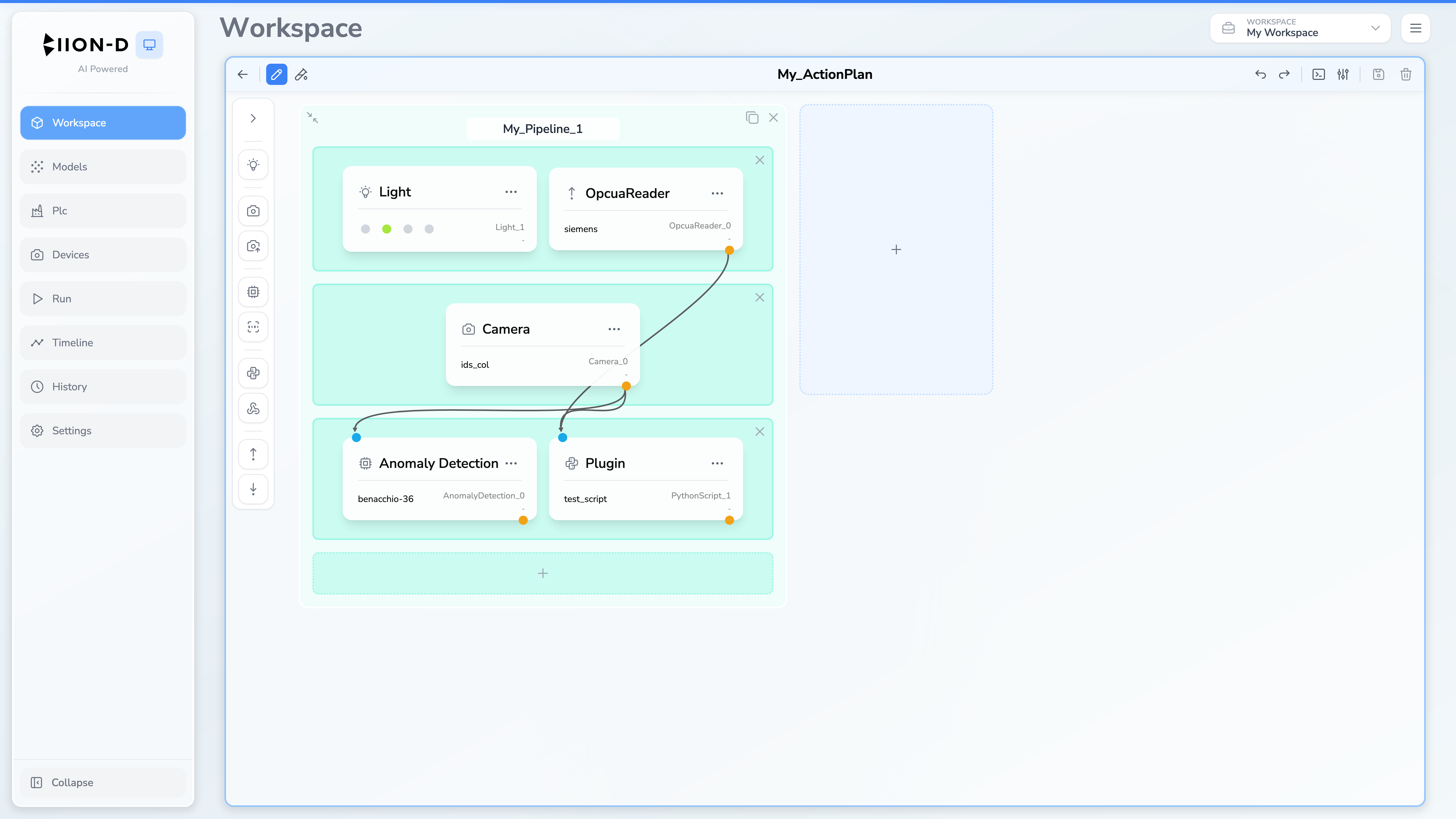
Key Concepts
| Concept | Description |
|---|---|
| Pipeline | A sequence of blocks that processes data from input (cameras) to output (results) |
| Block | A row of modules that execute in parallel. Blocks execute sequentially (top to bottom) |
| Module | A single operation: capture an image, run inference, control a light, execute a script, or communicate with a PLC |
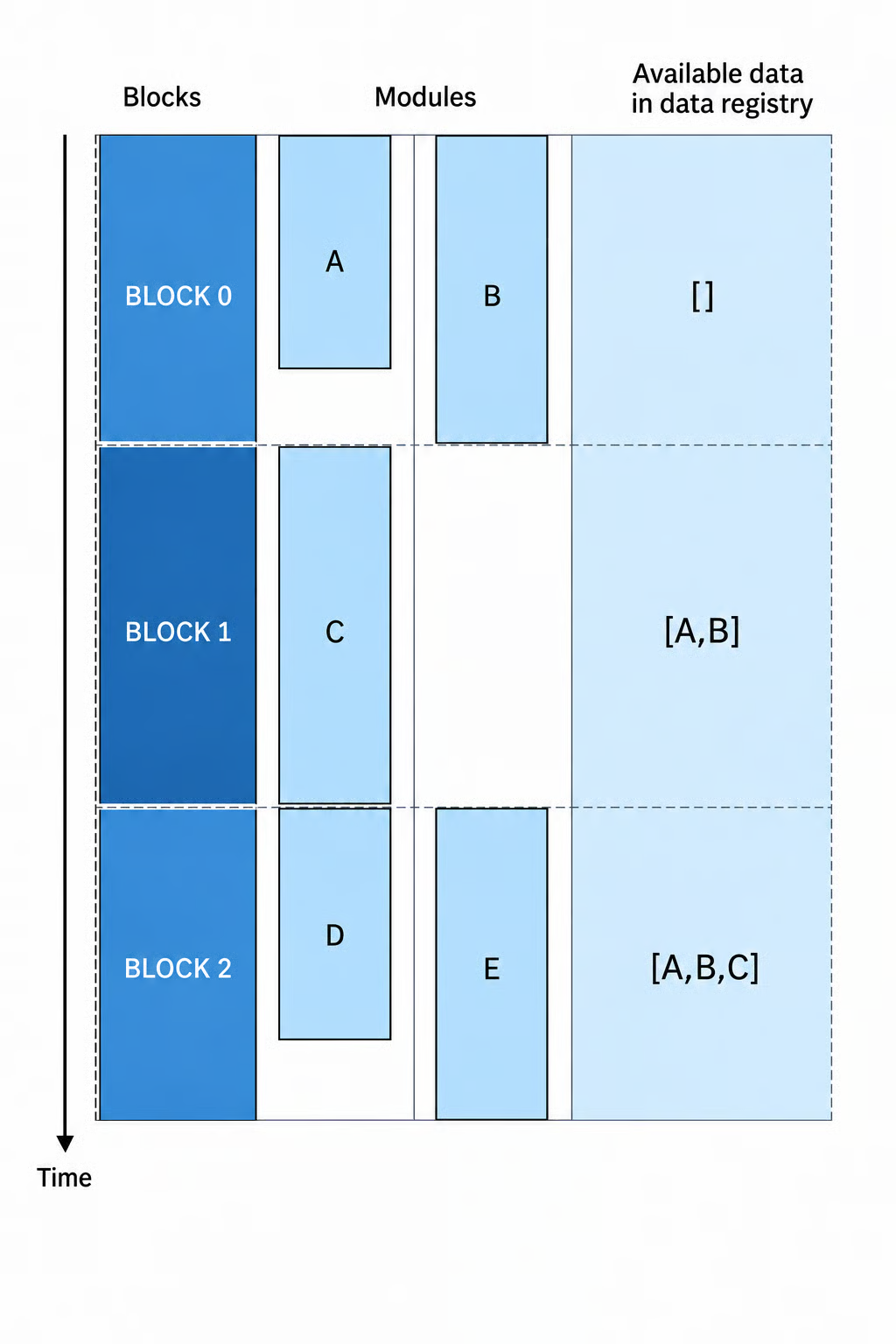
| Data Registry | The values produced during one run and made available to modules in later blocks |
Blocks
Blocks are the rows of a pipeline. They enforce execution order:
- Block 0 runs first — all its modules execute in parallel
- Block 1 runs after Block 0 completes — all its modules execute in parallel
- And so on…
This design allows you to:
- Run multiple cameras in parallel (same block)
- Ensure lights are configured before cameras capture (different blocks)
- Run multiple inferencers on different images simultaneously (same block)
Data Registry
The Data Registry contains the outputs produced during one pipeline execution. Values use dot notation, for example Camera_0.frame or AnomalyDetection_0.pred_score. Configuration dialogs only offer inputs that are available from previous blocks.
Default Fields
Every pipeline execution starts with these mandatory fields:
| Field | Default | Description |
|---|---|---|
compliance |
0 (Good) |
Overall compliance of the pipeline result. Updated automatically by inferencer modules. |
Data Access Patterns from Python Script
Write:  Date.export("custom_value", 123.3)
Read:   Data.get("camera_0.frame")  → image
Read:   Data.get("camera_0.execution_time")  → 12.5
Force compliance: Data.set_compliance(COMPLIANT) # COMPLIANT, UNCERTAIN, DEFECTED
Reserved Names
The following pipeline IDs are reserved and cannot be used:
overall_compliancecomplianceoverall_compliance_overridecompliance_override
Invalid Characters
Pipeline IDs cannot contain: . / ..
Validation Rules
BIION-D automatically validates pipelines at creation time and before execution. There are two levels of validation:
Block-Level Rules
These rules apply to modules within the same block:
| Rule | Description |
|---|---|
| Multi-camera exclusion | Two Camera modules with the same cam_label cannot be in the same block (cannot snap the same physical camera twice simultaneously) |
| Light-camera exclusion | A Light and a Camera module cannot coexist in the same block (lights must be set before capture) |
| Maximum one light per block | Only one Light module is allowed per block |
| Execution constraint validation | Each module’s execution constraint must be in the list of allowed constraints for its type |
Pipeline-Level Rules
These rules apply across all blocks in the pipeline:
| Rule | Description |
|---|---|
| Input dependency satisfaction | Every module’s declared inputs must be satisfied by outputs from modules in previous blocks |
| Unique module IDs | Every module in the pipeline must have a unique ID |
If validation fails, the pipeline cannot be tested or executed. The editor identifies the affected configuration. A draft can still be saved, so resolve validation errors before production use.
Execution Modes
Pipelines support two execution modes:
Frame Mode
The default mode. Each pipeline runs once, processes a single set of frames, and returns results.
Stream Mode
Continuous execution mode. The pipeline processes frames until it is stopped. A streaming Action Plan contains exactly one pipeline.
- The action plan can contain only one pipeline
- Results are queued and consumed by the client
Action Plan Aggregation
When all pipelines in an action plan have completed, their results are aggregated:
Aggregation Logic: BAD_UNC_GOOD
The overall compliance is determined by the worst result across all pipelines:
| Pipeline 1 | Pipeline 2 | Overall |
|---|---|---|
| Good (0) | Good (0) | Good (0) |
| Good (0) | Uncertain (1) | Uncertain (1) |
| Good (0) | Defected (2) | Defected (2) |
| Uncertain (1) | Defected (2) | Defected (2) |
This ensures that if any pipeline detects a defect, the entire action plan is marked as defected.